Latest News !

Five Steps to SEO-Friendly Site URL Structure

Some people say there is no such thing as SEO-friendly URL structure. They claim that search engines are perfectly capable of making sense of any type of URL and pretty much any URL structure. In most cases, the people who say this are web developers.

I’ve noticed that sometimes web developers and SEOs live in two parallel universes, each with its own center of gravity. While web developers basically care about crawlability, site speed, and other technical things, SEOs are mostly focused on what constitutes their sacred grail: website rankings and ROI.


1-What is an SEO-friendly URL structure?

First of all, let me start by saying that it is always better to call in an SEO manager early in the development stage, so that there is no need to make sometimes hard-to-implement tweaks afterwards.

From an SEO point of view, a site’s URL structure should be:

Straightforward: URLs with duplicate content should have canonical URLs specified for them; there should be no confusing redirects on the site, etc.

Meaningful: URL names should have keywords in them, not gibbering numbers and punctuation marks.
With emphasis on the right URLs: SEO-wise, not all URLs on a site are of equal importance as a rule. Some even should be concealed from the search engines. At the same time, it is important to check that the pages that ought to be accessible to the search engines are actually open for crawling and indexing.

2. Avoid dynamic and relative URLs


Depending on your content management system, the URLs it generates may be “pretty” like this one:

www.example.com/topic-name

or “ugly” like this one:

www.example.com/?p=578544


Static URLs contain your keywords and are more user-friendly, since one can figure out what the page is about just by looking at the static URL’s name.

Besides, Google recommends using hyphens (-) instead of underscores (_) in URL names, since a phrase in which the words are connected using underscores is treated by Google as one single word, e.g. one_single_word is onesingleword to Google.

3. Create an XML Sitemap


It’s a list of your site’s URLs that you submit to the search engines. This serves two purposes:
This helps search engines find your site’s pages more easily;
Search engines can use the Sitemap as a reference when choosing canonical URLs on your site. The word “canonical” simply means “preferred” in this case. Picking a preferred (canonical) URL becomes necessary when search engines see duplicate pages on your site.

4. Close off irrelevant pages with robots.txt

             
              There may be pages on your site that should be concealed from the search engines. These could be your “Terms and conditions” page, pages with sensitive information, etc. It’s better not to let these get indexed, since they usually don’t contain your target keywords and only dilute the semantic whole of your site.

The robotx.txt file contains instructions for the search engines as to what pages of your site should be ignored during the crawl. Such pages get a noindex attribute and do not show up in the search results.

Sometimes, however, unsavvy webmasters use noindex on the pages it should not be used. Hence, whenever you start doing SEO for a site, it is important to make sure that no pages that should be ranking in search have the noindex attribute.

5. Specify canonical URLs using a special tag


Another way to highlight canonical URLs on your site is by using the so-called canonical tag. In geek speek, it’s not the tag itself that is canonical, but the tag’s parameter, but we’ll just call it the canonical tag by metonymy.

Note: the canonical tag should be applied only with the purpose of helping search engines decide on your canonical ULR. For redirection of site pages, use redirects. And, for paginated content, it makes sense to employ rel=”next” and rel=”prev” tags in most cases.


Google Reads all your Emails


Google reads every email that you send and receive, so claims software giant Microsoft. In its latest campaign titled 'Don't get scroogled by Gmail', the software maker says that Google reads every email a user sends and receives in order to dish out related advertisements.

 Through the campaign, Microsoft asks users to switch to its own free email service Outlook.com, which it claims "doesn't go through the content of users' emails to show ads." It also asks users to sign an online petition against Gmail to let Google know that "going through personal email messages to sell ads is unacceptable."


On its website, Google says, "In Gmail, most of the ads we show appear next to an open email message and are related to the contents of the current email conversation or thread." Microsoft explains this with a host of examples on its website Scroogled.com. One example is Google advertising details of divorce lawyers to a woman who has emailed to her friend that she is separating from her husband.

 The maker of Windows operating system says Google has not given users the choice to not show their private emails to the company. It also highlighted that the internet search giant currently faces six class-action lawsuits because of its practice of sifting through subscribers' emails.

 Microsoft said, "We honour the privacy of our Outlook.com users, and we are concerned that Google violates that privacy every time an Outlook.com user exchanges messages with someone on Gmail. This campaign is as much about protecting Outlook.com users from Gmail as it is about making sure Gmail users know what Google's doing."

 Citing a GfK Roper study it commissioned, Microsoft states that 70% of email users in US are unaware that major email providers routinely engage in the practice of reading through their personal email to sell ads. When informed of the same, 88% of the people disapprove of this practice.

 Microsoft recently also took on Google Shopping for offering users' skewed choices.


Google+ Communities for Website Traffic


Content marketing drives business. Today’s online environment essentially demands it. Whether you are looking for more customers, a rise in the rankings, or publicity – creating good content has to be at the forefront of your online marketing strategy.
Blogging helps build valuable content around your message and brand. It gives the search engines something to index. It gives people something to link to. Last but not least, good content answers the questions that your target audience is asking. This helps you build credibility in your niche and can help enhance your company as an authority in your industry.
It’s easy to understand how creating good content is good for business. However, simply writing an article doesn’t make the magic happen. You won’t gain untold fame and link popularity on wit and writing style alone. You’ll need to roll up your sleeves and put in a little elbow grease to attract readers to your blog. Google+.
A Little Background
Google+ Communities is a place like-minded people congregate around a particular topic or niche. Communities are much like forums or Facebook Groups. And, much like Facebook, anyone is able to create their own. However, unlike Facebook Groups, Google+ allows brand pages to participate, and even start their own communities. For bloggers – or any website that publishes content for that matter – this is an opportunity to laser target your audience and drive traffic to your blog posts.
Time to Get Your Feet Wet
Don’t worry, the water’s nice. The majority of people you’ll find in the communities are quite friendly and engaging. Don’t be afraid to hop in and share your opinion. Of course, proper etiquette is required. You don’t want to join a community just to spam them with links back to your blog or website. This shows a lack of regard towards community spirit and the forum environment. Forums are built for the exchange of ideas and opinions. You want to give as much as you share.
1. Time to Mingle
The easiest way to get noticed is to get out there. No one is going to notice you if you’re not pounding the virtual pavement (so to speak). So, the first step is action. The first thing you’ll want to do is join the communities that have a topical relationship to your niche. For example, a website with a focus on SEO and online marketing would naturally gravitate towards Google+ Communities covering these topics. Here are some examples:
* SEO+: Search Engine Optimization / Web Design
* Social Media Marketing for Small Business Owners
You can also take it one step further and think of your target audience. If you are an SEO consultant, you naturally work with other business owners. Why not go where other small business owners are hanging out? The point here is to find groups where your audience congregates or looks for answers.
2. Share Content that Answers People’s Questions
People go online for entertainment or information. That is putting it as simply as you can. Often times people use forums to search for answers, ask questions, get opinions. This is where all that knowledge you have comes in. Show off your skills by answering people’s questions or offering up insight that gets them thinking. Don’t simply post a link to your content. Give them a clear answer that has value, build on the conversation, and then offer a link to one of your posts that explains the concept in more detail.
3. Comment on Other People’s Posts
Shining the spotlight on someone else is almost guaranteed to get you noticed. Aren’t we searching for the same thing? By actively engaging with what other people have to say, you’ll in turn pull some of that attention back to yourself. Do this often and people will appreciate the gesture. They’ll also be more likely to follow you and check out your website or blog.
4. Be Consistent
Consistency always pays off. This ties into everything you do in life. Once you find the communities that are beneficial to your brand, you want to stay consistent. Develop a routine that allows you to stay visible by commenting on posts, sharing your own, and sharing information that people find useful.
5. Become a Bastion of Information
When people see you as a source of information the dividends can be immeasurable. This is what being a thought leader and industry expert is all about. Good information and advice breeds trust. No amount of marketing dollars can achieve that.
6. Build a Community Around Your Brand
Launching your own Google+ Community can also be a great way to generate brand recognition. This can work really well if you already are part of a large network. Sometimes lists are easier to explain an approach, so here you go:
* Create a community around your niche and target audience with your brand page.
* Invite people from your personal network (Google+, Facebook, LinkedIn, Twitter).
* Have people in your company become part of the group. (They can also help with moderation).
* Generate useful content and start conversations that encourage participation.
Let The Good Times Roll
Google+ Communities to build traffic back to your website. If you walk away with anything from this article it should be this:
Do not focus on getting ‘clicks’ to your website. Instead, focus on building a reputation for yourself and your company. Once people recognize you as a source of valuable information they’ll check out your blog on their own. You’d be surprised how easy it is to win someone over simply by being helpful.


Google’s approach to Government requests for user data

Today is Data Privacy Day, when the world recognizes the importance of preserving your online privacy and security.  If it’s like most other days, Google—like many companies that provide online services to users—will receive dozens of letters, faxes and emails from government agencies and courts around the world requesting access to our users’ private account information. Typically this happens in connection with government investigations.

 It’s important for law enforcement agencies to pursue illegal activity and keep the public safe. We’re a law-abiding company, and we don’t want our services to be used in harmful ways. But it’s just as important that laws protect you against overly broad requests for your personal information. To strike this balance, we’re focused on three initiatives that I’d like to share, so you know what Google is doing to protect your privacy and security.

 First, for several years we have advocated for updating laws like the U.S. Electronic Communications Privacy Act, so the same protections that apply to your personal documents that you keep in your home also apply to your email and online documents. We’ll continue this effort strongly in 2013 through our membership in the Digital Due Process coalition and other initiatives.

 Second, we’ll continue our long-standing strict process for handling these kinds of requests. When government agencies ask for our users’ personal information—like what you provide when you sign up for a Google Account, or the contents of an email—our team does several things:

We scrutinize the request carefully to make sure it satisfies the law and our policies. For us to consider complying, it generally must be made in writing, signed by an authorized official of the requesting agency and issued under an appropriate law. We evaluate the scope of the request. If it’s overly broad, we may refuse to provide the information or seek to narrow the request. We do this frequently. We notify users about legal demands when appropriate so that they can contact the entity requesting it or consult a lawyer. Sometimes we can’t, either because we’re legally prohibited (in which case we sometimes seek to lift gag orders or unseal search warrants) or we don’t have their verified contact information.

We require that government agencies conducting criminal investigations use a search warrant to compel us to provide a user’s search query information and private content stored in a Google Account—such as Gmail messages, documents, photos and YouTube videos. We believe a warrant is required by the Fourth Amendment to the U.S. Constitution, which prohibits unreasonable search and seizure and overrides conflicting provisions in ECPA.

 And third, we work hard to provide you with information about government requests. Today, for example, we’ve added a new section to our Transparency Report that answers many questions you might have. And last week we released data showing that government requests continue to rise, along with additional details on the U.S. legal processes—such as subpoenas, court orders and warrants—that government use to compel us to provide this information.

 We’re proud of our approach, and we believe it’s the right way to make sure governments can pursue legitimate investigations while we do our best to protect your privacy and security.

7 Crucial Tactics for Writing a Radically Successful Guest Post

1. A guest post should funnel people to an outcome, not a home page

Every time you do a guest post, you’re given a little space in the post for a biography, with a link (as well as a few in-post links) that can direct readers back to your blog.

The mistake that most newbies make is they don’t give any thought to where they are sending those new readers.

Click away and you’re likely to end up on a home page or some nicely done but relatively unrelated post

What you need to do is funnel people toward a specific outcome.

Let’s say your goal is to get as many email subscribers as possible. A successful funnel would entail:
Creating a niche-specific free giveaway. You’d create an eBook that is centered around a very specific topic in your niche that will appeal to a well-defined group.
Creating a landing page or ad for that eBook. The next step is to add that eBook to your blog and give it away as a free incentive for joining your list, using a service like Aweber. If you don’t know how to do this I made a video.
Guest posting on closely related topics. Here’s the sexy part. You now go out and guest post on topics that are closely related to your free giveaway. Link back to your landing page/advert if you can, but even if you don’t you will be funneling and pre-selling people on the idea of your eBook.

Sending people back to random posts or a home page is just a waste of time.

Just like filling up your car with petrol, you need to put fuel in the gas tank, not pour it all over the engine. Use a content funnel to direct the flow of traffic toward your desired outcome or target.

2. A guest post should mention big bloggers in your niche

Simply put, one of the fastest ways to grow a new blog is to mention other sites with big audiences in your guest post appearances.

This strategy, while obvious to some, has many benefits.

First, it associates you with those experts.

Second, if you drop a handy email or Tweet before the guest post goes live, you can harness the sheer awesomeness of their contact lists. Most of the time they will at least tweet out your guest post and thus associate themselves with your content. This is also a nice bit of promotion that your “host blog” will appreciate.

And third, it opens a door with those bloggers. When you send them a guest post, they’ll have an idea of who you are, and will be that much more open to taking a look at what you send them.

This type of professional networking is extremely helpful if you want to place guest posts on good blogs. I think of it as giving before receiving.

3. A guest post should be followed up by sister posts

One of the coolest things I ever learned about guest posting was that you can leverage the fame of your guest post to create buzz for your own blog.

I actually learned it in reverse, and a good example is when I did a post about the best About Us pages, and mentioned Copyblogger.

Brian Clark kindly Tweeted my post, which helped me land a big chunk of traffic and some super fast indexing at the top of Google for the key phrase “best About Us pages.”

Since that time Brian has been active on other posts I’ve done. For example, he stopped by here to leave a comment.

Not only does this make me feel all warm inside because Old Man Clark is one of my heroes and has a cool goatee, it also has some pretty obvious and ongoing benefits.

Mention big bloggers in your guest posts, then give them a reason to tweet or promote follow-up posts you do. Don’t just reach out once — create follow-up content that continues that relationship.

Think of it as the second date.

4. A guest post should be aimed at 10 years of results, not 10 hours


The rewards of guest posting are cumulative…. you build more momentum the more you post.

I used to write a guest post and eagerly await the flow of traffic and increase in subscribers that occurs after being published.

I’d to spend the whole day looking at stats and monitoring the progress of the article on all the social networking sites.

But I soon realized the error of my ways. A guest post needs to be a 10-year strategy.

While still important, I now place a lot less importance on the initial flow of traffic and tweets.

Why?

For starters, I am more interested in how the guest post matures. So now I ask myself these questions in order to judge the success of a guest post:
Does it rank well on Google< for a keyword phrase that is going to continually benefit my own site and goals?
Does it boost my reputation and credibility in the niche?
Did it make me any new contacts in the industry?
Did it create a discussion on the post or somewhere else?

If you want to write guest posts that produce results for years to come, you need to do some solid keyword research as well as creating an exhaustive post that covers issues — to the point of becoming a timeless resource.

Jonathan Morrow does this extremely well here on Copyblogger. He writes resource-rich, original content that will rank well and get people interested in his upcoming releases.

5. Each guest post should be part of an anchor text strategy

Anchor text is the text you use when you link to a post.

Just above you’ll see that “Jonathan Morrow” is the anchor text for that link to his articles here on Copyblogger.

Your choice of anchor text is hugely important for search engine rankings.

We all know that relevant backlinks help us to rank better on Google, but the anchor text of those backlinks also plays a big role in what exact keywords we rank for.

When you do a guest post, you should have already done keyword research and know specifically what phrases you want to rank for, based on how much traffic they bring and how competitive they are. Remember, you want your guest post to be bringing you love from Google for the next ten years.

Once that post is live, you can then link back to it in the future using the desired anchor text. This will help you elevate your own post on someone else’s website so that it matures well.

Just remember that SEO copywriting has to work for humans first, search engine robots second. Mix it up sometimes, and only link to your article if it is relevant and useful for real-life human beings.

6. Each comment should be answered or used as material

One of the really important things to do when you guest post is stick around and answer every single question that you get in the comments.

It’s in the comments section that long term relationships are built with the readers that you are reaching on the new blog.

It’s in the comments section that you enhance your branding as an expert or fellow traveler or mentor.

I have never tested it, but I would guess that at least half of the loyal readers I get from guest posts left comments that I answered on the day of publication.

If a comment or question is really good, you can take the idea and use it as the germ of a post on your own blog. Announce it in the comments section and see how many people drop on over to see what you’ve done with it.

7. Guest posts should be aimed mostly at beginners

It might seem a little counter-intuitive, but most of the readers who interact with content, subscribe to your list, and eventually buy your products, are newbies.

Think about the entrance paths for finding posts. Most of the time people either Google a question because they don’t know the answer, or click a referral link on Facebook/Twitter/Blog because it’s something they are unfamiliar with.

A lot of any blog’s readers are new to that blog’s topic. And that tends to be where new readers come from — newbies looking for a grounding in the topic.

After a while, the intermediate group often trails off and focuses on their own projects, as opposed to sticking around to learn more skills.

The more successful guest posts are the ones that focus on topics that are well digested by beginners, especially if you are aiming at getting that post indexed well on Google.

Try to write list posts and articles with an instructional tone, full of resources and links.
What guest posting strategies work for you? I’d really like to hear about what guest posting strategies have worked or not worked for you.
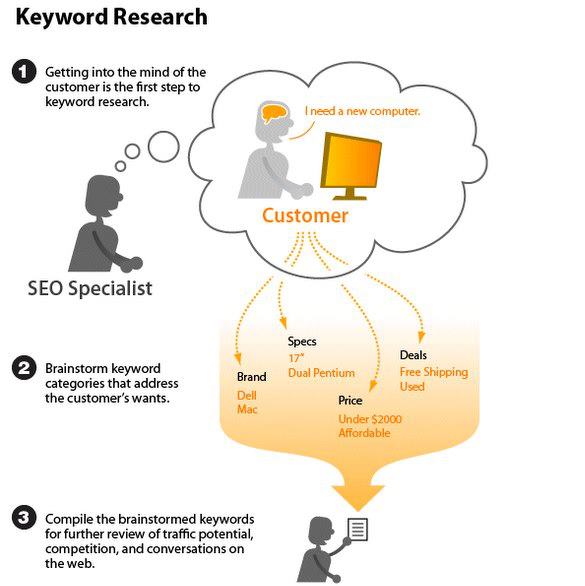
Keyword research is a component of diving into the mind of your targeted traffic. This is because you are basically predicting what users want based on a query they are performing in a search engine. 


Small Businesses Are Doing Wrong on Social Media

Over 900 million people in the world are on Facebook, including over 180 million Americans, or 1 in 2 adults. Twitter recently surpassed 300 million accounts. Small business owners are trying to take advantage of these trends, but few are fully reaping the rewards.

Here are 5 tips for small business owners to be more likeable and ensure greater success using social media:

1---Listen first. Before your first tweet, search Twitter for people talking about your business and your competitors. Search using words that your prospective customers would say as well. For example, if you’re an accountant, use Twitter to search for people tweeting the words “need an accountant” in your town. You’ll be surprised how many people are already looking for you.


2--Don’t tell your customers to like you and follow you, tell them why and how they should. Everywhere you turn, you see “Like us on Facebook” and “Follow us on Twitter.” Huh? Why? How? Give your customers a reason to connect with you on social networks, answering the question, “What’s in it for me?” and then make it incredibly easy to do so. Note the difference between these two calls to action: “Like my book’s page on Facebook” and “Get answers to all your social media questions

3- Wondering why nobody’s responding to your posts on Facebook? It’s probably because you’re not asking questions. Social media is about engagement and having a conversation, not about self-promotion. If a pizza place posts on Facebook, “Come on by, 2 pizzas for just $12,” nobody will comment, and nobody will show up. If that same pizza place posts, “What’s your favorite topping?” people will comment online– and then be more likely to show up.


4-  Share pictures and videos. People love photos. The biggest reason Facebook has gone from 0 to 900 million users in 7 years is photos. Photos and videos tell stories about you in ways that text alone cannot. You don’t need a production budget, either. Use your smartphone to take pictures and short videos of customers, staff, and cool things at your business, and then upload them directly to Facebook and Twitter. A picture really is worth a thousand words – and a video is worth a thousand pictures.

5-Spend at least 30 minutes a day on social media. If you bought a newspaper ad or radio ad, you wouldn’t spend 5 minutes on it or relegate it to interns. Plus, there’s a lot to learn, and every week, new tools and opportunities across social networks emerge. Spend real time each day reading and learning, listening and responding, and truly joining the conversation. The more time and effort you put in to social media, the more benefits your business will receive.


Copyright © 2015 Cheap SEO - Web Development Services in UK‎ | Islamabad,Pakistan. Designed by VisionLogix VisionLogix